Showing posts with label Windows Applications. Show all posts

Sunday, April 11, 2010

How to Lock Out Unwanted Users in Windows XP?


Want to keep people from accessing Windows, even as the default user? If you do not have a domain do not attempt this.

1. Open RegEdit
2. Go to HKEY_LOCAL_MACHINE\Network\Logon
3. Create a dword value "MustBeValidated"
4. Set the value to 1
This forced logon can be bypassed in Safe Mode on Windows 9x

Tags:-Windows,Windows lock users.windows tricks,windows registry tricks

Saturday, April 10, 2010

Backup / Restore the Registry in Windows Xp


To Backup/Restore the Windows Registry: Windows 9x For XP 2000 click here

1. If you are in MSDOS, at the C:\Windows prompt type
2. Attrib -s -r -h C:\Windows\System.dat (press Enter)
3. Attrib -s -r -h C:\Windows\User.dat (press Enter)

To make the backup copies type:

1. copy C:\Windows\System.dat C:\Windows\System.000 (press Enter)
2. copy C:\Windows\User.dat C:\Windows\user.000 (press Enter)

To Restore the Registry

1. copy C:\Windows\System.000 C:\Windows\System.dat (press Enter)
2. copy C:\Windows\User.000 C:\Windows\user.dat (press Enter)

Tags:-Windows XP,Windows Xp trick,Windows Xp,registery backup,registery restore

Wednesday, November 4, 2009

HTC announces new Windows Mobile HD2-Features and Specifications


HTC unveils its new HTC HD2 mobiles running on Windows Mobile 6.5-powered monster phone,in markets across Europe and Asia.HD2 is the first Windows phone with HTC Sense.HD2 is powered by Qualcomm's new 1 GHz Snapdragon mobile processor and will be the first Windows Mobile phone from HTC to come with the Sense UI, earlier seen on the Android based, HTC Hero.

HTC HD2 Specifications & Features

  • Size and Weight: 2.64′x4.4′x0.4′ and weighs 157 grams (5.54 ounces) with battery
  • Processor: Qualcomm MSM 8250, 1GHz Snapdragon processor
  • Memory: ROM: 512 MB RAM: 448 MB and Supports microSD memory card
  • Display: 4.3′ 480×800 WVGA resolution, 65K-color and Capacitive touch screen
  • Operating System: Windows Mobile 6.5 Professional With HTC Sense UI
  • Camera: 5 megapixel color camera, Auto focus and Dual LED flashlight
  • Sensors: G-Sensor, Proximity sensor and Ambient light sensor
  • Social Networking: Facebook integration, Sharing photos on Facebook and Twitter, Sharing videos on YouTube, HTC Peep for twittering
  • Tethering: Internet Sharing through USB or Bluetooth and Wi-Fi Router

Tags:-HTC,HTC Mobiles,HTC Latest Mobiles,HTC Upcoming Mobiles,HTC HD2,HTC HD2 windows mobile,Windows 6.5 Mobile,HTC HD2 features,HTC HD2 Features and Specifications,HTC HD2 image gallery,HTC HD2 releases

Saturday, August 8, 2009

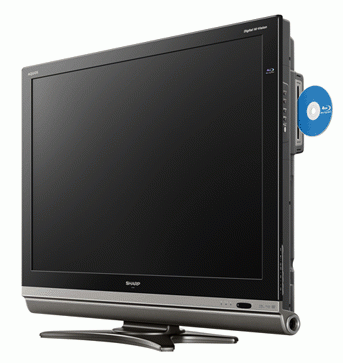
Sharp's new Aquos DX2 HDTV with Blue-Ray Player

Now a days devices offering compatibility with blue ray players is increasing rapidly.Sharp Japan introduces its new Aquos Dx2 Series HDTVs that come integerated with a Blue-Ray player.The size of this DX2 series ranges from 26 inches to 52 inches.

The range kicks off with two HD-Ready sets, the LC-26DX2 and LC-32DX2, packing 1,366 x 768 resolution panels, then rises through the Full HD LC-40DX2, LC-46DX2 and LC-52DX2 each with 1,920 x 1080 panels. Contrast on the former two is 7,000:1, while on the latter three it’s 15,000:1; there are also two HDMI ports on the 26 and 32 inch sets, rising to three on the 40, 46 and 52 inchers.

These 5 series HDTV's will be in the Japan Market from September 10 onwards.

Related Topics:-


Tags:-Aquos DX2 HDTV,Sharp Aquos DX2 HDTV,Aquos DX2 HDTV releases,Aquos DX2 HDTV features,Aquos DX2 HDTV specifications,Aquos DX2 HDTV releases,Aquos DX2 HDTV resolution,Sharp Aquos DX2 HDTV features,Aquos DX2 HDTV in Japan,Sharp Aquos DX2 HDTV images,Sharp Aquos DX2 HDTV releases

Sunday, July 12, 2009

Microsoft Releases new Internet Plugin Application Silverlight 3


Microsoft has launched Silverlight 3, newest version of its Rich Internet application (RIA) technology.The new plugin application will be a good competitor to Adobe Flash Player. Silverlight 3 is expected to offer enhanced internet usage experience especially with high quality video performance. The release is today, On the eve of the Microsoft Worldwide Partner Conference, to be held in New Orleans.

The newest iteration of Silverlight includes over 50 new features, ranging from enhanced video performance and improved quality to support for Visual Studio, Expression Blend and running Silverlight applications from the browser. Browser-wise, Silverlight 3 supports the latest browser iterations, including Internet Explorer 8 and Firefox 3.5, as well as GPU hardware acceleration.Microsoft Silverlight 3 can be downloaded at www.microsoft.com/silverlight. Users of Silverlight 2 will automatically be updated. Microsoft has also issued Silverlight 3’s software development kit (SDK), which can be downloaded from Microsoft’s site.

The new version of Silverlight application can be used in cases where no Internet connection is present. Silverlight 3 supports for IIS Smooth Streaming, which allows interactive 1080p HD video to be streamed using Microsoft's IIS web server software. Silverlight 3 takes advantage of 3D hardware acceleration.

Tags:Microsoft plugin Application,Microsoft Silverlight 3 internet application,New internet application from Microsoft,Microsoft Silverlight vs Adobe Flash Player,Microsoft Silverlight 3 features,Adobe Flash features,Adobe reader,Rich Internet Application from Microsoft,Adobe Internet Applications,Microsoft Web tools,Adobe Web tools,Mozilla Firefox,Mozilla Firefox 3.5 features, Microsoft Silverlight 3

Tuesday, July 7, 2009

Operating System From Google


Google has announced to launch shortly its open source operating system named Google Chrome OS.

Google claims the operating system to be simple, security conscious and fast. The Google Chrome OS is said to be web-centric and “lightweight”.Google boasts of the security feature of the OS so that the users don’t have to worry about viruses,malware and security upates.

The Google Chrome OS is mainly aimed at netbook PCs. The company is planning to release the OS in the second half of 2010.The Google Chrome OS is expected to be a good opponent for Microsoft Windows.
Tags:Google Chrome OS,Open source OS from Google,Operating system from Google,Google Chrome OS release date,Web based Operating System from Google,Microsoft Windows

Viewsonic newly introduced Flat screen monitor with Built-in PC


The Viewsonic VPC100 All-in-One PC is essentially a desktop pc with all of it'sessential parts - the processor, hard drive and all the usb ports designed to fit into what looks like a flatscreen pc monitor only. So, in a nutshell...pardon the punn, the entire desktop pc which used to consist of keybord, tower case, monitor and mouse, has now become the keybord, mouse and monitor. No more tower case.

Off course something like this had to happen at some point in time, with manufacturers always exploring new avenues to make their products more compact, more user friendly. Now, having said that, one would think that the manufacturers may have compromised somewhat on performance and specs to be able to fit. Surprisingly, compromise is not a word that comes to mind when hearing about the specs of this machine. While the pc may not be classifed as one of the most powerful machines on the market today, it does not really stand back when it comes to performance. I would think that for the eveyday software and applications that most of us use, this machine would be adequate.

The pc features an

  • 18.5" Color TFT Active Matrix LCD screen
  • with an effective display area of 16.1" horizontal x 9.1" vertical, and 18.5" diagonally.
  • Resolution is 1366x768, with a contrast Ratio of 1000:1 (typ), 5ms (typ) response time
  • A 1.3 megapixel web cam
  • It also features 2x3 watt speakers.
  • An Intel Atom N270 CPU processor
  • Processing speed: 1.6GHz Single Core, FSB 533MHz, BGA.
  • Chipset is an Intel 945GSE + ICH7M.
  • 1GB DDR2 SDRAM
  • Windows XP Home operating system and a 2.5"
  • 160GB SATA hard drive.
  • 4 USB 2.0 ports
  • 2x PS/2, RJ45 Gigabit Ethernet LAN
  • Earphone and Microphone jacks, and 4-in-1 card reader (XD, SD, MMC, MS).

Actually, if you have ever opened up a computer towercase, you would probably have noticed something right away - a fairly large portion of unused space. I suppose we can compare it with an old 1965 model car. If you've ever checked under the hood, you would also notice the same phenomenon - a large amount of unused space inside the engine compartment. These days of course, there is hardly any space for a mouse to even move around in the engine compartments of newer model cars.

The pc is now available at selected outlets and sells for about $500, which is surpising when one considers that any new type of technology or application of that technology is usually costly - at least at first.

Related Topics:

Tags:-Viewsonic VPC100 All-in-One PC,Viewsonic,Viewsonic,Viewsonic features and specifications,Viewsonic Vp100,Viewsonic Vp100 latest technology news,Viewsonic Vp100 stills,Viewsonic Vp100 prices,Viewsonic Vp100 releases,Viewsonic Vp100


Sunday, July 5, 2009

Change MAC address in Windows

Although MAC (Memory Address Control) addresses are meant to be permanent, it is possible to change the MAC address reported in the operating system. Changing of a MAC address is sometimes necessary for maintaining privacy when connecting toWI-Fi and for interoperability, and the act is sometimes called “spoofing”.

An Internet Service Provider or ISP generally binds the service to a particular MAC address, meaning that if a network card or a router is changed by the user, the service can no longer be accessed. However, this can be countered by changing the MAC address of the new interface being used.

In Windows, the MAC address can be changed in the property menu of the Ethernet adaptor. The exact name found on the “Advanced” tab depends on the Ethernet driver used and a user may find various names such as “Ethernet Address”, “MAC Address”, “Network Address” or “Locally Administered Address” in the tab. There is a better method than this which requires registry editing permissions. System registry keys that are under HKEY_LOCAL_MACHINE\SYSTEM\CurrentControlSet\Control\Class\{4D36E972-E325-11CE-BFC1-08002BE10318} are to be passed over. Network interfaces can be found here and the MAC address of the adaptor is set from the contents of the “Network Address”.

The adaptor can be reset by using acommand line utility offered for free by Microsoft called Devcon. The addresses of all cards, including those that are not changed through the property menu of the adaptor can be changed with the SMAC MAC Address Changer. The new address can be checked by clicking on Run from the Start menu and entering the command module (cmd) followed by typing ‘ipconfig/all’ into the command prompt, which shows the MAC address under the physical address.

All routers do not have the facilities to change the MAC address and the mode of changing varies greatly in those that so. The “clone MAC address” feature in a router helps change the MAC address by obtaining the MAC address of one of the machines present in the network and replacing the current address of the router with the acquired one. Some routers also allow the MAC address to be changed manually.

Using a MAC address as the sole method of identification is not a very good idea seeing that MAC addresses can be altered. Another method, the IEEE 802.1x can be used instead as it is coming up as a standard authentication method for low-level devices.

Wednesday, July 1, 2009

Mozilla announces mobile browser Fennec Alpha 2


Mozilla has announced Fennec Alpha 2, the mobile version of web browser firefox.This release is anyway offered just for testing purposes.

The new mobile browser provides touchscreen support and other interactions suitable for mobile phones and other handheld devices. Fennec retains prominent functionalities like the Smart URL bar and support for add-ons.

This release seeks to get extensive feedback on the company’s move towards the user experience. The company focuses to engage Mozilla community teams, including localizers and testers. It also wishes to get opinions from the Web devolepers. Moreover, it serves as an encouragement for the add-on developers to port existing add-ons and formulate new ones for mobile.

This Windows Mobile alpha release persistently concentrates on stability, performance, and amalgamation with the Windows Mobile OS. Additionally, this version also comes with several fixes and a novel glossy theme.

This application can be used by anyone operating on Windows Mobile 6.
Tags:Mobile internet,Mobile browsers,Free Mobile browser downloads,Mobile browsers from Mozilla,Mozilla free downloads,New mobile browser from mozilla,Mozilla firefox mobile version,Mozilla firefox mobile version downloads,Mozilla mobile browser downloads,Mozilla fennec alpha 2,Mozilla fennec alpha 2 download,Mozilla fennec alpha 2 features,Mozilla fennec alpha 2 details

Sunday, June 28, 2009

Free Upgrade to Windows 2007 from Lenovo


Lenovo has offered users a free upgrade to Windows 2007 for the systems sold.The update will be available with all systems sold between 26 June and 31 January with the Home Premium, Business and Ultimate versions of Windows Vista.It is a limited offer to home and small business system purchases. Large scale purchases will have to use Microsoft's volume licensing programme.

By the way Microsoft has offered a deferred cost programme to encourage more PC vendors to offer free upgrades to Windows 7.Both Microsoft and PC vendors are hope that this free update campign will attract more users to buy systems without having to wait for the release of new Microsoft windows 7 edition.
Tags:Microsoft Windows Vista,updates for Microsoft Windows Vista,Free updates for Microsoft Windows Vista,Updates for Microsoft Windows 2007 ,Microsoft windows 7 edition,Updates for windows 7 from Lenovo,Lenovo Windows updates,Lenovo new laptops,Windows vista updates from microsoft,Windows vista premium ,Windows vista upgrades,Lenovo upgrades for windows

Wednesday, June 24, 2009

Free Antivirus From Microsoft


Microsoft has launched a trial version of it’s free antivirus named Microsoft Security Essentials (MSE) software in US,China,Brazil and Israel.The new antivirus offers protection against protection against viruses, trojans, rootkits and spyware.The introduction of new antivirus marks the inclusion of free security software with Windows.

The software which can be freely downloaded from Microsoft website offers automatic updation for it’s users. How the new product will complete with established players in antivirus industry is to be seen.

Some comments about the new product have already come from some of the top antivirus manufacturers like Symantec,AVG.They point out that the new product will be suitable of general security only.They doubt it’s capability in giving specific purpose protection like firewall protection, web protection, anti-spam and identity safeguards.

75,000 trial versions of MSE, codenamed Morro, will be available initially in the US, Brazil, China and Israel. The software will be released in other countries later this year.


Tags:Microsoft,Microsoft Windows,Microsoft Windows Vista,Microsoft antispyware,Microsoft security,Microsoft Internet security,Antivirus from microsoft,Microsoft Security Essentials(MSE),firewall protection,anti-spam software,latest antivirus,latest antivirus software,AVG Antivirus,AVG products,AVG new releases,Symantec,Symantec Security,Symantec Security solutions,Internet Security

Monday, June 22, 2009

Mozilla releases Firefox 3.5 RC2


Mozilla released Firefox 3.5 Release Candidate 2 , The new version can be downloaded from Mozilla website. Release Candidate 2 is the first version of Firefox 3.5 is faster and more stable than the before released beta versions. New features include new ways to work with the browser features to under-the-hood improvements that Mozilla developers claim will make .Here are some of the new features you'll find in Firefox 3.5.


Private Browsing


Like a number of new browsers, Firefox 3.5 adds a private browsing mode to its features.In private browsing mode, Firefox won't remember anything--history, cookies, usernames, or passwords--from your session. When you start private browsing, Firefox closes all of the pages that you currently have open, but it saves all of your open windows so you can quickly get back to what you were doing before switching to private browsing, which is a nice touch.


Purposeful forgetfullness


To provide further privacy, Firefox 3.5 can "forget" any particular site. While browsing one can open the History panel, right-click any website reference, and choose 'Forget This Site'.
It is a little difficult to remove all references to a site from your history. When you tell Firefox to forget a subdomain of a site, it won't forget other subdomains of that site.

Lost and Found Feature


Firefox 3.5 now permits sites to find your location by using your IP address and by gathering data about nearby Wi-Fi networks, via Google Location Services (if you have WWAN card in your notebook, it will use cell-phone towers to find your location, just as This feature could be particularly useful for people who are visiting map sites or business user-review sites in search of nearby locations (though few sites support geolocation at present).
For the sake of your security and privacy, each site that wants to use your location must have your permission to do so. Firefox sends your IP address, nearby Wi-Fi networks, and a unique random ID (which expires after two weeks) to the server in order to find your whereabouts.

Tear-Off Tabs


Tabs work better in Firefox 3.5 than in previous versions of the browser. Besides being able to rearrange the tab order, you can drag tabs off the toolbar and drop them either onto another Firefox window (to move the tab to that window) or onto your desktop to create a new window containing that tab.


This feature is not unique to Firefox 3.5. Both Chrome and Safari include the same functionality, and aesthetically their implementations may be a bit smoother. For example, if you drag tabs around in Safari or Chrome, the tabs rearrange in real time, whereas in Firefox you'll get an arrow indicating where the tab will go when you release the mouse button. In terms of functionality, though, Firefox's tear-off tabs work just as you'd expect them to.
Another subtle improvement to tabs is the addition of a small plus-sign (+) button on the tab bar, which makes creating a new tab a little more intuitive.


Get Back to What You Were Doing


Firefox 3.5 builds upon the previous Firefox's session-restore feature by remembering what you've entered into Web forms before you close the window. For example, suppose that I have to close the browser midway through replying to a reader comment on pcworld.com; when I reopen Firefox and restore my previous browser session, everything that I typed into the text box will still be there. It's about time a Web browser did this. A word of caution, though: If you start typing something that you don't want someone else to see later, be sure to delete it before you close the window.
Among Firefox 3.5's other new features are improved performance (Firefox claims that 3.5 is eight times faster at JavaScript performance than Firefox 3.0), integrated support for Ogg Theora video, and support for the latest and greatest Web technologies.


Tags:Mozilla,Mozilla FireFox,Mozilla FireFox Download,Mozilla Firefox new version,Firefox 3.5 download,JavaScript,Mozilla new release,Wi-Fi networks, Mozilla Firefox 3.0,Mozilla Firefox latest version

Tuesday, June 9, 2009

How to turn off Autoplay Option


Autoplay may works on DVD's,external drives,flash drives by connecting through PC.In some cases if the Autoplay is on then some malware in the device will give a clean path onto my system.If you want to Fix Auto play option,then follow the steps

Step1. Press START Button

Step2. Click on CMD-type gpedit.msc

Step 3. Press Enter

The you have move to a GROUP POLICY page.In the tree pane on the left navigate to and select

Step 4. Click " ComputerCongiguration"

Step 5.Click "Administrative Templates"

Step 6.Click "System"

Step 7.Scroll in the right pane and double click "TurnOffAutoplay


Step 8. In the "TurnOffAutoplay"properties dialogue box, click enabled and choose "All drivers" from the drop down list underneath and click ok

Tags:-Windows Applications,Turn Off Autoplay.Turn on Autoplay,System Tricks,Windows Tricks,New Ideas